> ## Documentation Index
> Fetch the complete documentation index at: https://docs.launchblitz.ai/llms.txt
> Use this file to discover all available pages before exploring further.
# Overview
> Use launch presets to reuse names, tickers, images, links, launch settings, and quick launch actions.
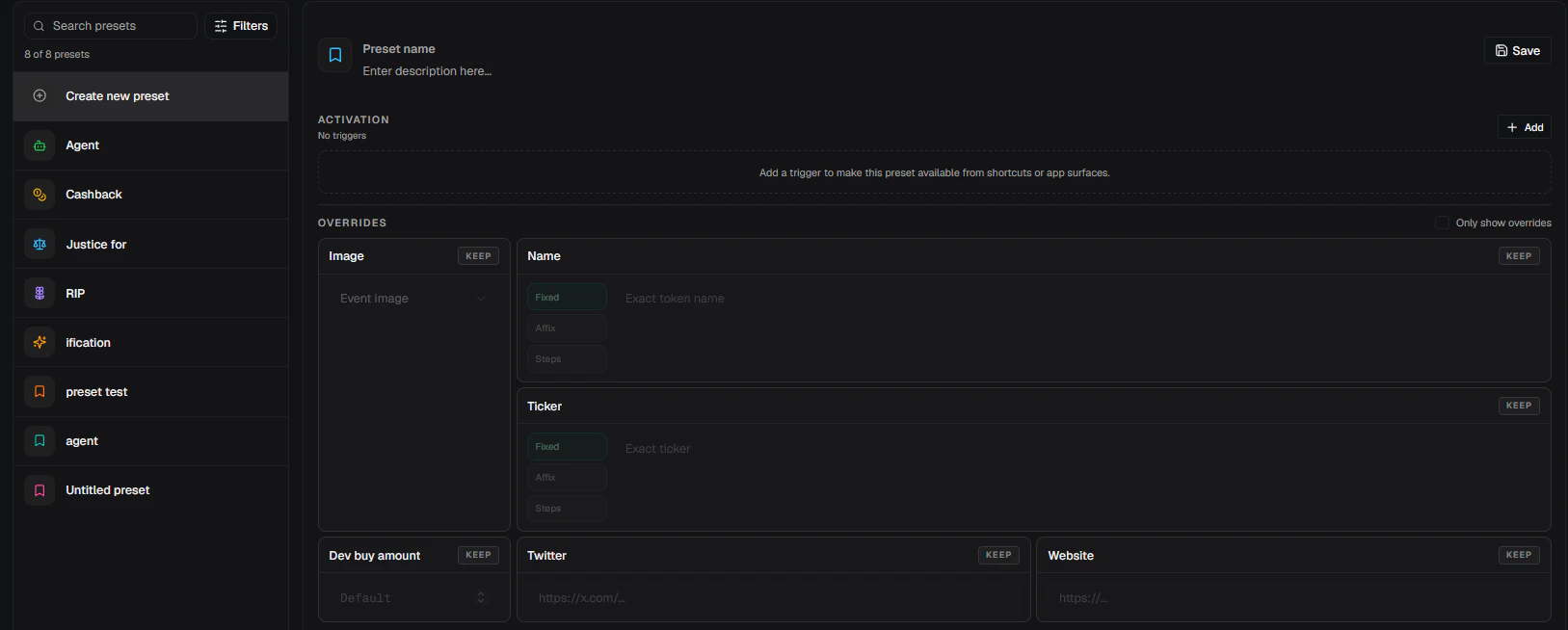
Use **Presets** to save reusable launch behavior. A preset can change the coin name, ticker, image, Twitter link, website link, platform, buy amount, and supported launch settings. It can also decide where it appears, such as the create form, Saved Coins, AI name rows, Vamp rows, or a keyboard shortcut.
 ## What Presets Can Do
* Apply selected values to the create form without launching.
* Launch using the current create form plus the preset's saved overrides.
* Save name and ticker transforms, such as prefixes, suffixes, translations, and ticker cleanup.
* Reuse fixed images, event images, generated image requests, Twitter links, and websites.
* Save configuration-only launch settings, then mark one as the default create-form preset.
* Place preset buttons on AI name suggestions, Vamp results, Saved Coins, the create form, or a keyboard shortcut.
Presets with **Launch** activation can submit a launch. Review the current form, selected wallet, platform, buy amount, and preset overrides before using launch-mode buttons or hotkeys.
## Open Presets
Open **Profile > Presets**.
The page has a preset list on the left and the editor on the right. Use **Create new preset** to start from a blank preset, or select an existing preset to edit it.
The search controls can filter by activation mode, surface, content, and source:
| Filter | Use it for |
| -------------- | -------------------------------------------------------------------------------- |
| **Activation** | Find presets that **Apply** or **Launch** |
| **Surface** | Find presets shown on Keyboard, AI name, Vamp, Create form, or Saved Coins |
| **Content** | Find configuration-only presets, presets with names or tickers, images, or links |
| **Source** | Separate built-in presets from custom presets |
## How Presets Apply
Presets use a **Set** and **Keep** model.
| State | Behavior |
| -------- | -------------------------------------------------------------- |
| **Set** | The preset owns that value and applies it when the preset runs |
| **Keep** | The preset leaves the current form or session value alone |
When you click **Apply**, LaunchBlitz updates matching create-form values and stops there. When you click **Launch**, LaunchBlitz combines the current form with the preset's **Set** values, then launches from that result.
Use **Apply** while building or reviewing a coin. Use **Launch** only for presets you trust and have tested with safe amounts.
## Preset Guides
Agent, Cashback, Justice For, RIP, and ification.
Choose where presets appear and whether they apply or launch.
Control names, tickers, images, links, platforms, and launch settings.
Markers, search, layout, default config presets, reset, and delete behavior.
## Where Presets Appear
| Surface | What users see |
| --------------------- | -------------------------------------------------------------------------------------------------------------------- |
| **Create form** | Name presets beside the name and ticker fields; configuration presets near launch controls or in the amount selector |
| **Saved Coins** | Image or marker tiles that can launch or apply saved coin-style presets |
| **AI name** | Preset marker buttons beside AI names and past-coin AI names |
| **Vamp** | Preset marker buttons on Vamp result rows |
| **Keyboard shortcut** | A hotkey that fires the preset from the active workspace |
## What Presets Can Do
* Apply selected values to the create form without launching.
* Launch using the current create form plus the preset's saved overrides.
* Save name and ticker transforms, such as prefixes, suffixes, translations, and ticker cleanup.
* Reuse fixed images, event images, generated image requests, Twitter links, and websites.
* Save configuration-only launch settings, then mark one as the default create-form preset.
* Place preset buttons on AI name suggestions, Vamp results, Saved Coins, the create form, or a keyboard shortcut.
Presets with **Launch** activation can submit a launch. Review the current form, selected wallet, platform, buy amount, and preset overrides before using launch-mode buttons or hotkeys.
## Open Presets
Open **Profile > Presets**.
The page has a preset list on the left and the editor on the right. Use **Create new preset** to start from a blank preset, or select an existing preset to edit it.
The search controls can filter by activation mode, surface, content, and source:
| Filter | Use it for |
| -------------- | -------------------------------------------------------------------------------- |
| **Activation** | Find presets that **Apply** or **Launch** |
| **Surface** | Find presets shown on Keyboard, AI name, Vamp, Create form, or Saved Coins |
| **Content** | Find configuration-only presets, presets with names or tickers, images, or links |
| **Source** | Separate built-in presets from custom presets |
## How Presets Apply
Presets use a **Set** and **Keep** model.
| State | Behavior |
| -------- | -------------------------------------------------------------- |
| **Set** | The preset owns that value and applies it when the preset runs |
| **Keep** | The preset leaves the current form or session value alone |
When you click **Apply**, LaunchBlitz updates matching create-form values and stops there. When you click **Launch**, LaunchBlitz combines the current form with the preset's **Set** values, then launches from that result.
Use **Apply** while building or reviewing a coin. Use **Launch** only for presets you trust and have tested with safe amounts.
## Preset Guides
Agent, Cashback, Justice For, RIP, and ification.
Choose where presets appear and whether they apply or launch.
Control names, tickers, images, links, platforms, and launch settings.
Markers, search, layout, default config presets, reset, and delete behavior.
## Where Presets Appear
| Surface | What users see |
| --------------------- | -------------------------------------------------------------------------------------------------------------------- |
| **Create form** | Name presets beside the name and ticker fields; configuration presets near launch controls or in the amount selector |
| **Saved Coins** | Image or marker tiles that can launch or apply saved coin-style presets |
| **AI name** | Preset marker buttons beside AI names and past-coin AI names |
| **Vamp** | Preset marker buttons on Vamp result rows |
| **Keyboard shortcut** | A hotkey that fires the preset from the active workspace |