> ## Documentation Index
> Fetch the complete documentation index at: https://docs.launchblitz.ai/llms.txt
> Use this file to discover all available pages before exploring further.
# Overrides
> Choose which preset values are set, kept, transformed, or generated when a launch preset runs.
Overrides control what the preset changes. Each row can be **Set** or **Keep**. Use **Set** for values the preset should own, and **Keep** for values that should still come from the tweet, AI suggestion, current create form, or manual edits.
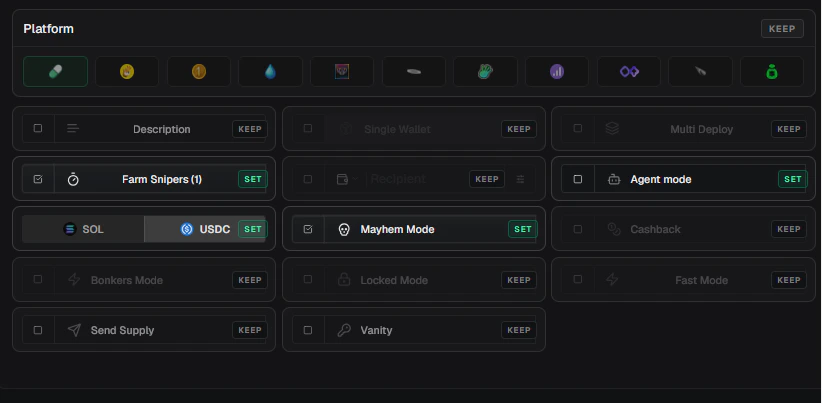 ## Set And Keep
| State | Behavior |
| -------- | ----------------------------------------------------------------- |
| **Set** | The preset applies the row's saved value or transform |
| **Keep** | The preset ignores the row and leaves the current value unchanged |
Click a **Keep** row to set it, or use the row's **Set/Keep** button to toggle it.
Start with fewer **Set** rows. Add more only when the preset needs to control those values every time.
## Name/Ticker Overrides
Name/ticker overrides control the coin **Name** and **Ticker**.
| Mode | Use it for |
| --------- | ------------------------------------------ |
| **Fixed** | Always use one exact name or ticker |
| **Affix** | Add text before or after the current value |
| **Steps** | Build a transformation from ordered steps |
For ticker steps, you can start from the current name or current ticker.
### Step Options
| Step | Use it for |
| --------------------------- | ---------------------------------------------------- |
| **Clean whitespace** | Trim and collapse extra spaces |
| **Take words** | Build a value from selected word positions |
| **Delete words** | Remove matching words or phrases |
| **Replace words** | Swap words or phrases for replacement text |
| **Capitalize first letter** | Uppercase only the first character |
| **Title case** | Capitalize each word |
| **Uppercase** | Make ticker-style uppercase text |
| **Lowercase** | Normalize text for matching |
| **Acronym** | Use first letters as a compact ticker |
| **Add prefix** | Add fixed text before the value |
| **Add suffix** | Add fixed text after the value |
| **Sanitize ticker** | Remove characters that do not belong in a ticker |
| **Truncate** | Limit length to the ticker limit or a custom maximum |
| **Translate** | Translate into Chinese, Japanese, Thai, or Hebrew |
## Image Overrides
The **Image** row controls what image the preset uses.
Use **Event image** when the preset should reuse the image already selected from the tweet, AI result, paste, or current form.
Use **Fixed URL** when the preset should always use the same image. You can paste a URL, choose a saved image, upload from disk, or paste an image into the field.
Use **Draw request** when the preset should generate an image when it runs. Available request types include **Draw paint**, **Draw ASCII**, **Draw letter**, and **Use canvas**.
Draw request prompts can use placeholders such as `{{name}}`, `{{ticker}}`, `{{base}}`, and `{{baseticker}}`. LaunchBlitz fills them from the preset result before generating the image.
## Link Overrides
Use **Twitter** and **Website** when the preset should set launch links.
Leave these rows on **Keep** when links should come from the tweet, profile, or current form.
## Platform And Config Overrides
Use **Platform** when the preset should force a launch platform. When Platform is **Set**, LaunchBlitz shows configuration rows that are available for that platform.
Available configuration rows include:
| Row | Use it for |
| ------------------------- | ----------------------------------------- |
| **Description** | Save a reusable coin description |
| **Bundle** | Use a saved bundle configuration |
| **Multi-deploy quantity** | Set how many launches to run |
| **Dev buy amount** | Set the preset buy amount |
| **Auto-sell delay** | Apply an automatic sell delay |
| **Fee split** | Save fee share and split behavior |
| **Agent mode** | Save Pump.fun agent and flywheel settings |
| **Mayhem** | Toggle Mayhem Mode when supported |
| **Cashback** | Toggle Cashback when supported |
| **Bonkers** | Toggle Bonkers Mode when supported |
| **Locked** | Toggle Locked Mode when supported |
| **Multi-wallet** | Save Four.meme multi-wallet settings |
| **Send supply** | Save send-supply recipients |
| **Vanity key** | Save a vanity mint key setting |
## Locks And Presets
Create-form locks win over preset changes. If name, ticker, image, Twitter, or website is locked in the create form, LaunchBlitz keeps the locked value even when the preset has that row set.
Use locks when you want to protect a value while testing presets, applying multiple presets, or launching from fast surfaces.
## Override Examples
Set **Name** and **Ticker**, keep everything else. This is best for create-form name buttons such as **Justice For**, **RIP**, or your own prefix/suffix presets.
Set **Name**, **Ticker**, **Image**, and **Dev buy amount**, then add a **Saved coins** activation. This creates a reusable visual launch tile.
Set **Platform** and the launch settings you want, but keep **Name**, **Ticker**, **Image**, and links. This makes a clean default create-form preset.
Set launch configuration rows, keep name and ticker, and add an **AI name** activation with **Launch**. This lets the AI name provide the name and ticker while the preset controls launch settings.
## Set And Keep
| State | Behavior |
| -------- | ----------------------------------------------------------------- |
| **Set** | The preset applies the row's saved value or transform |
| **Keep** | The preset ignores the row and leaves the current value unchanged |
Click a **Keep** row to set it, or use the row's **Set/Keep** button to toggle it.
Start with fewer **Set** rows. Add more only when the preset needs to control those values every time.
## Name/Ticker Overrides
Name/ticker overrides control the coin **Name** and **Ticker**.
| Mode | Use it for |
| --------- | ------------------------------------------ |
| **Fixed** | Always use one exact name or ticker |
| **Affix** | Add text before or after the current value |
| **Steps** | Build a transformation from ordered steps |
For ticker steps, you can start from the current name or current ticker.
### Step Options
| Step | Use it for |
| --------------------------- | ---------------------------------------------------- |
| **Clean whitespace** | Trim and collapse extra spaces |
| **Take words** | Build a value from selected word positions |
| **Delete words** | Remove matching words or phrases |
| **Replace words** | Swap words or phrases for replacement text |
| **Capitalize first letter** | Uppercase only the first character |
| **Title case** | Capitalize each word |
| **Uppercase** | Make ticker-style uppercase text |
| **Lowercase** | Normalize text for matching |
| **Acronym** | Use first letters as a compact ticker |
| **Add prefix** | Add fixed text before the value |
| **Add suffix** | Add fixed text after the value |
| **Sanitize ticker** | Remove characters that do not belong in a ticker |
| **Truncate** | Limit length to the ticker limit or a custom maximum |
| **Translate** | Translate into Chinese, Japanese, Thai, or Hebrew |
## Image Overrides
The **Image** row controls what image the preset uses.
Use **Event image** when the preset should reuse the image already selected from the tweet, AI result, paste, or current form.
Use **Fixed URL** when the preset should always use the same image. You can paste a URL, choose a saved image, upload from disk, or paste an image into the field.
Use **Draw request** when the preset should generate an image when it runs. Available request types include **Draw paint**, **Draw ASCII**, **Draw letter**, and **Use canvas**.
Draw request prompts can use placeholders such as `{{name}}`, `{{ticker}}`, `{{base}}`, and `{{baseticker}}`. LaunchBlitz fills them from the preset result before generating the image.
## Link Overrides
Use **Twitter** and **Website** when the preset should set launch links.
Leave these rows on **Keep** when links should come from the tweet, profile, or current form.
## Platform And Config Overrides
Use **Platform** when the preset should force a launch platform. When Platform is **Set**, LaunchBlitz shows configuration rows that are available for that platform.
Available configuration rows include:
| Row | Use it for |
| ------------------------- | ----------------------------------------- |
| **Description** | Save a reusable coin description |
| **Bundle** | Use a saved bundle configuration |
| **Multi-deploy quantity** | Set how many launches to run |
| **Dev buy amount** | Set the preset buy amount |
| **Auto-sell delay** | Apply an automatic sell delay |
| **Fee split** | Save fee share and split behavior |
| **Agent mode** | Save Pump.fun agent and flywheel settings |
| **Mayhem** | Toggle Mayhem Mode when supported |
| **Cashback** | Toggle Cashback when supported |
| **Bonkers** | Toggle Bonkers Mode when supported |
| **Locked** | Toggle Locked Mode when supported |
| **Multi-wallet** | Save Four.meme multi-wallet settings |
| **Send supply** | Save send-supply recipients |
| **Vanity key** | Save a vanity mint key setting |
## Locks And Presets
Create-form locks win over preset changes. If name, ticker, image, Twitter, or website is locked in the create form, LaunchBlitz keeps the locked value even when the preset has that row set.
Use locks when you want to protect a value while testing presets, applying multiple presets, or launching from fast surfaces.
## Override Examples
Set **Name** and **Ticker**, keep everything else. This is best for create-form name buttons such as **Justice For**, **RIP**, or your own prefix/suffix presets.
Set **Name**, **Ticker**, **Image**, and **Dev buy amount**, then add a **Saved coins** activation. This creates a reusable visual launch tile.
Set **Platform** and the launch settings you want, but keep **Name**, **Ticker**, **Image**, and links. This makes a clean default create-form preset.
Set launch configuration rows, keep name and ticker, and add an **AI name** activation with **Launch**. This lets the AI name provide the name and ticker while the preset controls launch settings.