> ## Documentation Index
> Fetch the complete documentation index at: https://docs.launchblitz.ai/llms.txt
> Use this file to discover all available pages before exploring further.
# Testing
> Test social events, variables, function outputs, and side effects before activation.
Tests let you run a graph against synthetic events without waiting for a live post. The source used by a graph test depends on whether the graph calls functions:
* A graph without function calls runs from the current editor state, so the test can include unsaved canvas edits.
* A graph with function calls runs from the stored exact graph-and-function bundle for the selected versions. Unsaved graph or function edits are not included.
A result only describes the program used by that run. Confirm the selected versions and save and compile before treating a pass as activation evidence. Tests can also verify that the graph emits the expected launches, trades, trace notifications, and other side effects.
## What A Graph Test Contains
* A name and optional description.
* One event type supported by the graph.
* Event details such as account, text, media, post type, or profile changes.
* Optional test-only overrides for variables marked **Instance exposed**.
* A list of expected side effects.
Supported event fixtures include **Tweet Event**, **Truth Social Event**, **Instagram Post Event**, **Instagram Story Event**, **Profile Update Event**, and **Following Update Event**.
## Add A Test
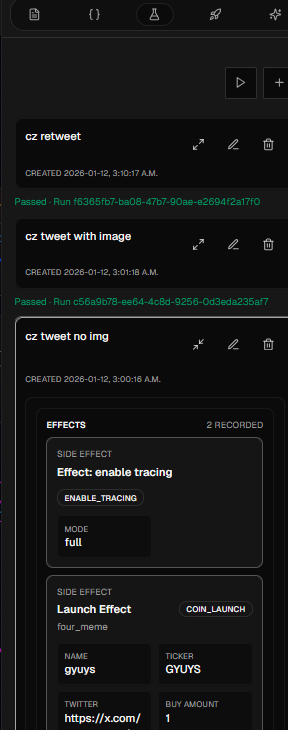
Select the graph version, then open **Test Results** in the right sidebar.
Click the plus button. If the graph has more than one event entry point, choose which event the test supplies.
Enter a recognizable test name and fill in the event fields. For tweets, you can model an original post, reply, quote, or retweet and include a related post when applicable.
Enable a test-only override for any variable marked **Instance exposed** whose fixture value should differ from the graph version's default. This does not create or change an instance value.
Add the launches, buys, sells, trace notifications, logs, tracing, timeouts, or AI errors that should occur.
Save the test, confirm the intended graph version, then use the play button to run its saved tests.
 ## Match The Right Details
Each expected-effect field can be **Strict** or **Free**:
* **Strict** requires the exact value you enter.
* **Free** normally requires the field to exist but accepts its runtime value.
* Image checks can require any image, one exact URL, or ignore the image.
`fee_share` is an intentional exception: setting it to **Free** ignores that field completely and does not require it to exist. Use **Strict** when the fee-share value must be checked.
A strict Pump.fun fee-share check compares the complete runtime JSON. For one extracted Solana address receiving 100% of the allocation, use the concrete address from that test fixture:
```json theme={null}
{
"shareholders": [
{
"address": "So11111111111111111111111111111111111111112",
"share_bps": 10000
}
]
}
```
Each `share_bps` value must be an integer from 1 through 10,000, and the shareholders must total 10,000 basis points. Do not use a placeholder address when the expected recipient comes from the event.
Effect matching does not enforce order. Configure the effect type and fields that matter, but do not use the order of the expected-effect list to assert execution sequencing. Inspect the trace and use explicit execution connections when sequence is part of the behavior.
`coin_launch` effects do not expose the **Draw Ticker** renderer style. Keep the exact style in the scenario description, set the image expectation to require **Any** image when appropriate, and verify the **Draw Ticker** style and image connection while reviewing the graph. Use an exact image URL only when that URL is itself deterministic behavior.
Make identity fields strict, such as launchpad, name, ticker, and suggest-only behavior. Leave generated transaction identifiers free unless their exact value is part of the behavior.
## Cover Successful And Rejected Events
A useful test set normally includes:
* The intended successful event.
* Similar authors or profiles that must not match.
* Missing, malformed, or multiple candidate values.
* Each supported post type that should behave differently.
* Boundary values for slices, amounts, thresholds, and lists.
* A no-effect case for an event that should be ignored.
* Independent-action behavior when one request should produce multiple effects.
For address-driven automations, include a valid address, invalid address, no address, and multiple-address test. State which valid address should win.
## Read A Failure
The test list distinguishes runtime errors from failed expectations. Expand the failed test to inspect:
* Which nodes ran and in what order.
* The values received and produced by each node.
* The branch the graph selected.
* Variable changes and reused values.
* Every side effect emitted.
* The node or connection associated with an error.
Selecting a failed test can highlight the relevant node or connection on the canvas.
A function-free graph can pass with unsaved editor changes, while a function-bearing graph excludes unsaved changes from its stored bundle. Save and compile before the final run, confirm the selected versions, and review fixtures after behavior changes.
## Test Functions Separately
Function tests use the function's named boundary instead of a social event:
* Supply every required input or rely on a defined input default.
* Enter values only for outputs you want to assert.
* For impure functions, add the complete expected-effect list in execution order. Function effect assertions require the count, order, and configured fields to match exactly.
After a function passes, rerun parent graph tests. A passing function does not prove that its callers supply the right inputs or handle its outputs correctly.
Tests simulate graph execution and validate effects, but they are not a substitute for checking live wallet balances, platform availability, and instance limits before activation.
## Match The Right Details
Each expected-effect field can be **Strict** or **Free**:
* **Strict** requires the exact value you enter.
* **Free** normally requires the field to exist but accepts its runtime value.
* Image checks can require any image, one exact URL, or ignore the image.
`fee_share` is an intentional exception: setting it to **Free** ignores that field completely and does not require it to exist. Use **Strict** when the fee-share value must be checked.
A strict Pump.fun fee-share check compares the complete runtime JSON. For one extracted Solana address receiving 100% of the allocation, use the concrete address from that test fixture:
```json theme={null}
{
"shareholders": [
{
"address": "So11111111111111111111111111111111111111112",
"share_bps": 10000
}
]
}
```
Each `share_bps` value must be an integer from 1 through 10,000, and the shareholders must total 10,000 basis points. Do not use a placeholder address when the expected recipient comes from the event.
Effect matching does not enforce order. Configure the effect type and fields that matter, but do not use the order of the expected-effect list to assert execution sequencing. Inspect the trace and use explicit execution connections when sequence is part of the behavior.
`coin_launch` effects do not expose the **Draw Ticker** renderer style. Keep the exact style in the scenario description, set the image expectation to require **Any** image when appropriate, and verify the **Draw Ticker** style and image connection while reviewing the graph. Use an exact image URL only when that URL is itself deterministic behavior.
Make identity fields strict, such as launchpad, name, ticker, and suggest-only behavior. Leave generated transaction identifiers free unless their exact value is part of the behavior.
## Cover Successful And Rejected Events
A useful test set normally includes:
* The intended successful event.
* Similar authors or profiles that must not match.
* Missing, malformed, or multiple candidate values.
* Each supported post type that should behave differently.
* Boundary values for slices, amounts, thresholds, and lists.
* A no-effect case for an event that should be ignored.
* Independent-action behavior when one request should produce multiple effects.
For address-driven automations, include a valid address, invalid address, no address, and multiple-address test. State which valid address should win.
## Read A Failure
The test list distinguishes runtime errors from failed expectations. Expand the failed test to inspect:
* Which nodes ran and in what order.
* The values received and produced by each node.
* The branch the graph selected.
* Variable changes and reused values.
* Every side effect emitted.
* The node or connection associated with an error.
Selecting a failed test can highlight the relevant node or connection on the canvas.
A function-free graph can pass with unsaved editor changes, while a function-bearing graph excludes unsaved changes from its stored bundle. Save and compile before the final run, confirm the selected versions, and review fixtures after behavior changes.
## Test Functions Separately
Function tests use the function's named boundary instead of a social event:
* Supply every required input or rely on a defined input default.
* Enter values only for outputs you want to assert.
* For impure functions, add the complete expected-effect list in execution order. Function effect assertions require the count, order, and configured fields to match exactly.
After a function passes, rerun parent graph tests. A passing function does not prove that its callers supply the right inputs or handle its outputs correctly.
Tests simulate graph execution and validate effects, but they are not a substitute for checking live wallet balances, platform availability, and instance limits before activation.