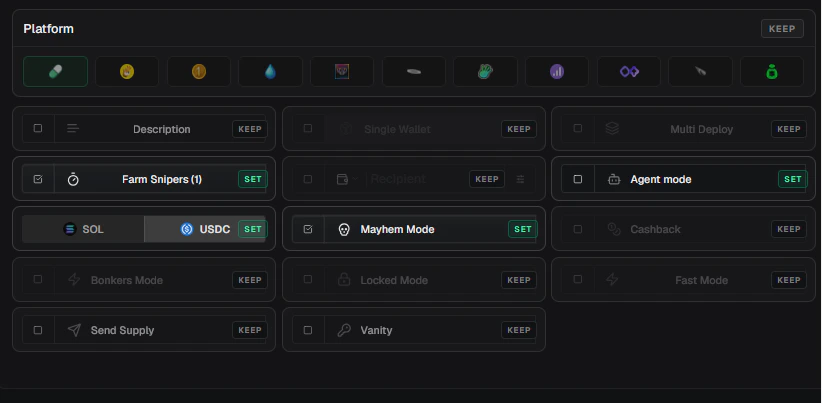
Use Set and Keep to decide exactly which launch settings a preset controls.
Set And Keep
Click a Keep row to set it, or use the row’s Set/Keep button to toggle it.
Name/Ticker Overrides
Name/ticker overrides control the coin Name and Ticker.
For ticker steps, you can start from the current name or current ticker.
Step Options
Image Overrides
The Image row controls what image the preset uses.- Event image
- Fixed URL
- Draw request
Use Event image when the preset should reuse the image already selected from the tweet, AI result, paste, or current form.
{{name}}, {{ticker}}, {{base}}, and {{baseticker}}. LaunchBlitz fills them from the preset result before generating the image.
Link Overrides
Use Twitter and Website when the preset should set launch links. Leave these rows on Keep when links should come from the tweet, profile, or current form.Platform And Config Overrides
Use Platform when the preset should force a launch platform. When Platform is Set, LaunchBlitz shows configuration rows that are available for that platform. Available configuration rows include:Locks And Presets
Create-form locks win over preset changes. If name, ticker, image, Twitter, or website is locked in the create form, LaunchBlitz keeps the locked value even when the preset has that row set. Use locks when you want to protect a value while testing presets, applying multiple presets, or launching from fast surfaces.Override Examples
Name preset
Name preset
Set Name and Ticker, keep everything else. This is best for create-form name buttons such as Justice For, RIP, or your own prefix/suffix presets.
Saved coin tile
Saved coin tile
Set Name, Ticker, Image, and Dev buy amount, then add a Saved coins activation. This creates a reusable visual launch tile.
Configuration preset
Configuration preset
Set Platform and the launch settings you want, but keep Name, Ticker, Image, and links. This makes a clean default create-form preset.
AI name launch preset
AI name launch preset
Set launch configuration rows, keep name and ticker, and add an AI name activation with Launch. This lets the AI name provide the name and ticker while the preset controls launch settings.